If your oven door won’t unlock while dinner is baking, turn the oven off. Leave Self Clean off with food inside, and don’t pull harder on the handle. On a GE range or wall oven that locked itself during Bake, press Clear/Off and let the oven reach room temperature before trying the door again. If food has caught fire, keep the door closed. Turn off the heat if safe; if the fire continues or you feel unsafe, leave and call 911 from outside.
The door locked while you were cooking
A GE oven with an automatic self-clean latch should not engage that latch in Bake. Once the oven is cool, try the handle normally. If the door releases, you can remove the pan. If the cold door stays shut, leave the oven off and arrange service. GE also describes a cleaning-cycle reset for certain empty ovens. A pan inside rules out that option.
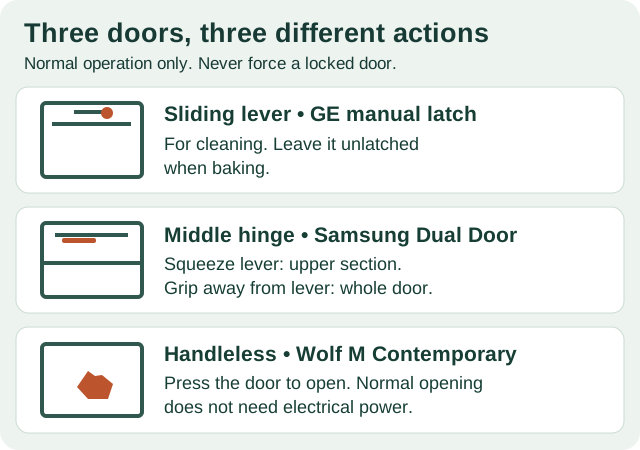
On older ranges, a horizontal lever above the door slides into place for cleaning. On a GE with this design, leave the lever in its normal cooking position during Bake. If someone slid it while the oven was hot, resist the temptation to push it back by force. After cooling, some older GE latches have a release button to press while moving the lever to the left. Check the manual before trying that movement.
If the sequence actually started in Self Clean, cancel as your manual directs and let the oven cool. Cancel stops the program; it does not promise an immediate release. If the door opens but the oven no longer heats, that is a different post-cleaning problem.
Only the top half of a Samsung door opens
Look at the handle before blaming the lock. The Samsung NE59J7850WS electric range has one door with a hinge across its middle. On this design, the handle gives you two different ways in:
- To reach the upper section, squeeze the lever as you take the handle, then pull.
- To open the whole door, grip the lever-free part of the handle and pull normally. Keep your fingers off the lever throughout the swing; squeezing it midway can release the upper section unexpectedly.
Use those grips only when the oven is safe to open and no cleaning lock is active. If the top opens but the full door still resists with the correct grip, stop there. Tell service which section opens. One Flex Duo owner could still open the top after the full door jammed. Cutting power and restoring it made no difference; a service visit eventually restored access, but the owner did not know what was repaired. That pattern alone does not identify a failed latch motor.
The display says “Locked,” but what is locked?
On a Wolf Legacy E Series oven, holding Lock for three seconds releases the controls. On a Wolf L Series, the corresponding pad is Panel Lock. Neither user setting fastens the door. If the buttons respond again but the door remains physically stuck, repeating the button sequence won’t release it.
Frigidaire uses a different design on models whose manual specifies the six-second Off lock feature: this setting operates the door lock as well. Hold Off for six seconds to cancel that feature. Use this only for a matching control layout and manual; it is not an override for a hot self-cleaning oven.
No handle, and the power is out
A blank display need not mean you have lost access. On a Wolf M Series Contemporary handleless wall oven, the normal opening action is a press on the door. It is mechanical and works without power. Stand clear of the swing: the soft-opening door travels all the way down rather than resting partway. This is for ordinary opening, not for defeating a cleaning lock. If a normal press on a cool door does nothing, don’t wedge anything into the gap.
What to tell service when the cool door still won’t open
Describe the last successful action, not just the word “locked.” Was the oven baking, cleaning, or idle? Is the lock message still showing? Does the handle move a little? On a double oven, name the cavity. Three incidents show why those distinctions matter:
- A Whirlpool GBD307PDB09 owner got a cheesecake out after interrupting power. On the next attempt to cook, the display said “door”; further power resets didn’t restore cooking. Getting the pan out had not resolved the fault.
- On a GE double oven, the upper door remained locked after a long power interruption and a cleaning attempt. The lower oven still worked. That was useful information about which cavity was affected, but it did not establish a failed control board.
- On another GE Profile double oven, the owner tried the breaker and a partial cleaning cycle. The lock light finally went out while the upper door remained shut. Report the light and the actual door position separately.
None of these cases calls for copying a repair through the door gap. Leave the panels in place. If you see a crooked door or a hinge sitting higher on one side, mention that before anyone assumes the electronic lock is at fault.